Removing piece-level records
Instructions for removing piece-level records from Calm
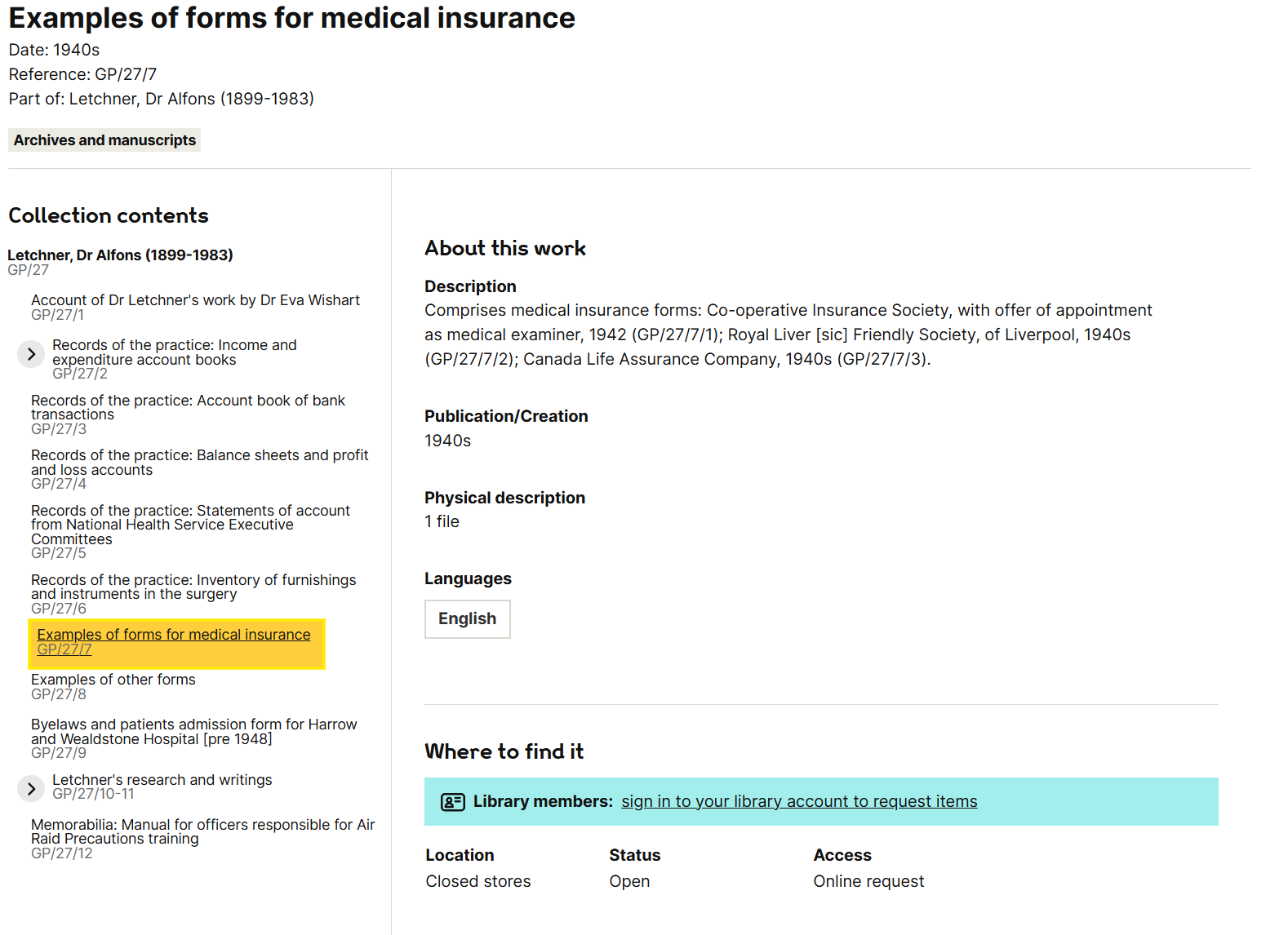
Identifying items to edit
Search for an entire collection (RefNo plus *, e.g.
PPSUL*)Sort the resulting hitlist by RefNo and look through the results to identify where the piece-level records are and how many items they sit beneath.
Look out for items that appear to contain just a single piece record. This will need to be checked against the physical file
Checking the physical item
Finding the item in the stacks
In Calm, note the box number for each item in the
BoxNumberfield and see if a location is in theLocationfield. If not, you’ll need to look up the location in the ring-binder in the basement stacks
Checking the item
Once you have located your item, check that it is contained within a single box and note how many parts (folders) it is in.
Items spread across multiple boxes is a PROBLEM and will need to be fixed. See A single item in multiple locations for guidance.
One item comprising multiple folders within the same box is very common and not a problem, but it might determine how you proceed (see next section).
If not already there, write the PublicRef for the item (not pieces) on the folder. For multi-folder items, make sure “File 1/3”, “File 2/3” etc. is written on each folder. In Calm, check the extent matches (see below).
In most cases you are not required to go through every folder to make sure all the pieces are there, but if you happen to notice anything is missing, flag this with an Archivist or Metadata Analyst.
If Calm suggests an item contains a single piece record, check whether this is the case. More likely, only one of several pieces has been given a Calm record. This will need to be noted in the description field (see below)
When checking the item, you may discover multiple items packaged. This is a problem, but it is outside the remit of this task, unless it impacts the pieces you are working on. See Multiple items packaged together for guidance.
Deciding the approach
In most cases, the best approach is to move the piece-level information to the item record. This will almost certainly be the case if the item is contained in a single folder.
If the item is spread across multiple folders, the preference is still to move the piece information into the item, making sure the Calm extent field says “1 file (in [number] parts)”
Creating multiple items
If the item is spread across multiple folders and there are numerous piece records and/or the piece records are very detailed, it might be better to split the item into multiple items (1 folder = 1 item).
Work out which pieces are in which folders and how many item records you need to create.
In Calm, open the Item record above the pieces and clone it to create the additional Item records needed. Copy the RefNo into each new
RefNofield and add "a", "b" etc. to the end of each one to create unique RefNos that sit in the correct place in the hierarchy. For example: PPHCT/C/1aThe PublicRef should mirror the RefNo but with the extra forward slash. Alternatively, if the existing PublicRef includes the range of pieces, modify this to give the correct range for the first item and follow the format for the new items.
If modifying the PubliRef of the existing item, add its old PublicRef to the
Previous_Numbersfield
Examples
Existing PublicRef does not include pieces:
Old PublicRef = PP/HCT/C/1
New PublicRef = PP/HCT/C/1 (original item); PP/HCT/C/1a (new item)
Existing PublicRef is a range of pieces:
Old PublicRef = PP/HCT/C/1/1-20
New PublicRef = PP/HCT/C/1/1-6 (original item); PP/HCT/C/1/7-20 (new item)
Edit all the item records, following the guidance below. Update the extent of the original Item record and check if the date also needs modifying. In ArchivistNotes field in the new Item records, add the following text:
Record created as part of piece-level deletion work in [month year] by [initials]
Editing the Calm item record
Press F9 before making any edits
Find the item record and its piece-level children. Edit the following item record fields:
Description
Copy & paste information from the piece-level records to the item. Key fields are the PublicRef; Title; Date; and Description fields. Quickly check the rest of the record, though other fields are less likely to contain data. If any fields duplicate what is already in the item record, you can ignore them.
PublicRef: should be retained in the item record in case it has previously been documented by researchers and/or cited
Title: in most cases this will be where the key information is recorded
Date: should be recorded alongside the specific piece, if dates vary across the pieces. If every piece has the same date, you do not need to include these in the description (date will be given in the
Datefield)Description: sometimes contains additional information to supplement the title. In some cases the pieces will share similar titles and the key distinguishing information is in the description
Other_Number: some collections may have previous non-Wellcome references recorded in the other_number field. These should be included in the item record description alongside the other corresponding piece-leve information.
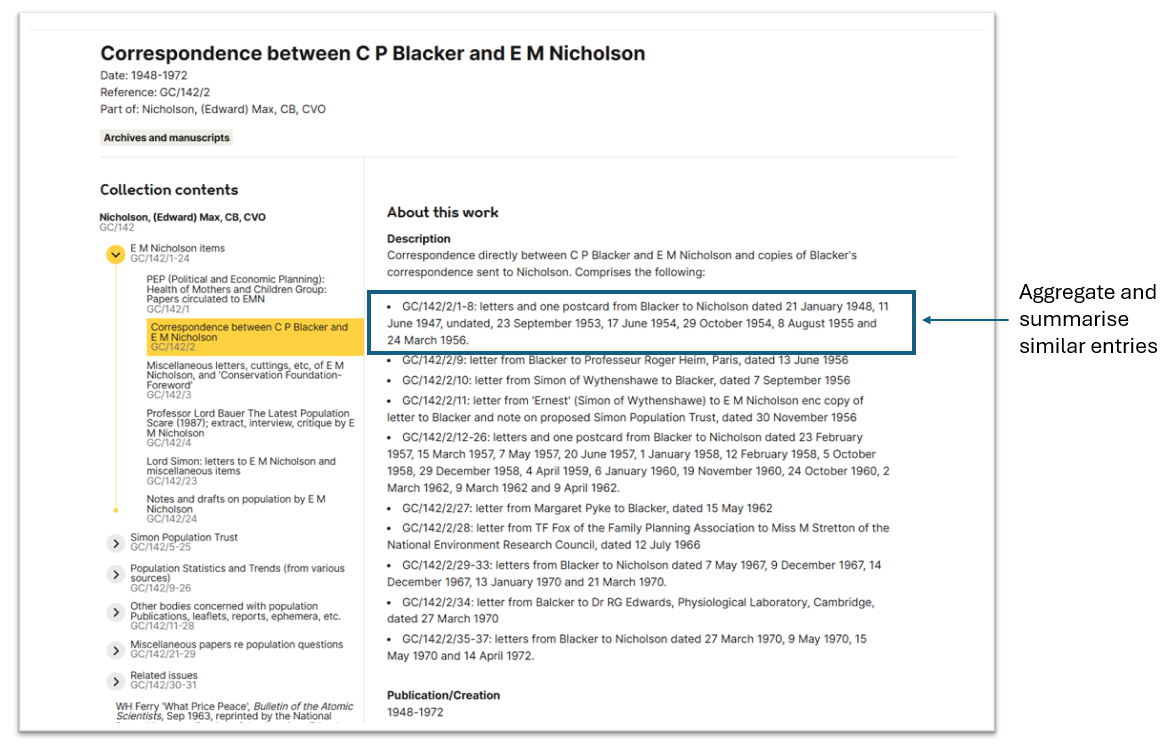
Where there are several pieces and/or there is a lot of variation, the best tactic is to list the pieces. Consider aggregating descriptions of very similar piece records (particularly correspondence)

Use html tags for formatting the description field:
<p></p> [for paragraphs]
<br> [breaks]
<li></li> [unordered list]
<ol></ol> [ordered list]
<i></i> [italics]
<b></b> [bold]
If appropriate, you can write a prose summary rather than a list, but you should still include the piece-level archive references

If the item record already contains text in the description field, try and integrate this into the text you add. For instance, if the field already says "Presumably extracted from school files by Chave", this could be updated to say “Comprises the following, presumed to have been extracted from school files by Chave: [...list of pieces]"
If only some of the pieces has been given a Calm record, you do not need to itemise the remaining pieces in your description. However, you should indicate that the list/description is not exhaustive.
When copy & pasting text, look out for and correct spelling mistakes and typos.
However, for time reasons, do not worry about updating formatting to bring text in line with current procedures (i.e. formatting of citations)
Extent
Check the extent is accurate ("1 file" or "1 volume") and specifies the number of parts, if multiple ("1 file (in 2 parts)")
Date
Check the date in the item record is correct. It should be a range encompassing all the piece-level dates (e.g. June 1980-November 1984). If the content all dates from a single year, the date field can either specify the months, or can just give the year (e.g. May-July 1944 vs. 1944)
Update the date in the item record if it does not conform to current practice. There is a full list of acceptable date formats. Commonly, the update is writing out months in full (January 1900 rather than Jan 1900)
ArchivistNotes
Add the following phrase to the field (if the field already contains text, add it to the end):
“Piece-level data moved to item record and piece records flagged for deletion in [month] 2025 by [initials]
Once finished, save the item record. Changes will automatically feed through to the front end in a couple of hours.
Because changes to the item record will automatically appear online, try not to leave item records in a draft state for too long (i.e. overnight)
Marking piece-level records for deletion
Create a hitlist containing just the piece-level records.
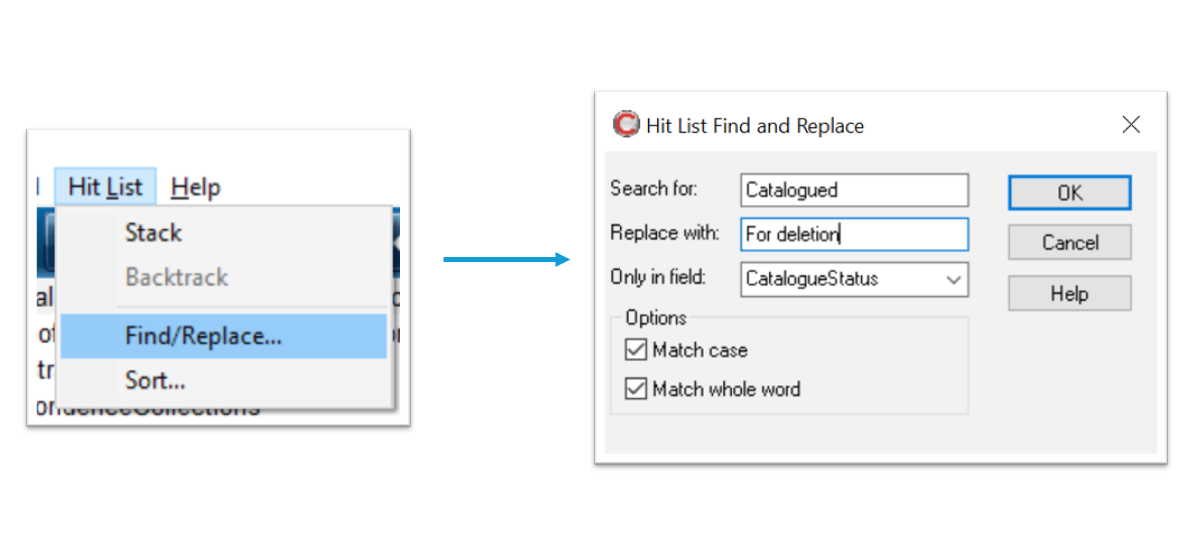
Using the Find/replace function, change the
CataogueStatusfield from “Catalogued” to “For deletion”. Also change theHarvestfield from “Yes” to “No”.

FAQs
Last updated